Ask an AI-powered app to help draft an email, plan a trip, or manage health data, and it needs to understand a lot about the person asking. As AI-powered apps become more capable, AI app privacy Risks is becoming a critical consideration for developers and businesses. These applications often process conversations, documents, location data, financial information, and other sensitive user data.
Chatbots, recommendation engines, healthcare assistants, financial tools, and support systems all lean on real user data to function at all. Conversations, location, uploaded files, payment details, behavioral patterns, sometimes all of it passes through several systems before a single AI response comes back.
The hard part isn’t just locking that data down. It’s knowing exactly what’s being collected, why, where it travels, how long it sticks around, and whether the AI itself can figure out things a user never actually said. A privacy-first AI app needs more than encryption and a login screen: deliberate data collection, controlled model inputs, transparent third-party integrations, real retention limits, and testing that doesn’t stop at launch. This piece walks through where AI app privacy problems actually start, and what building one properly looks like.
Why AI-Powered Apps Are Creating a New Privacy Challenge
Traditional apps mostly stored what a user typed in, and maybe tracked how they moved through the interface. AI-powered apps go further. They often need context, sometimes a lot of it, to produce a response that actually feels useful.
A support chatbot works better with visibility into order history. A health app gives better guidance with access to symptoms or medication logs. A finance assistant needs spending data to say anything meaningful about a budget. Each of these is a reasonable trade for the user, until nobody’s tracking exactly how much data is flowing in, or what happens to it afterward.
This is where older privacy frameworks start to strain. A cookie banner and a privacy policy were built around static apps collecting a known, fixed set of fields. An AI feature can pull in context dynamically, sometimes generating new inferred data points the user never provided in the first place. Consent that covers “we collect your name and email” doesn’t really cover a model quietly inferring income bracket from spending patterns.
Sensitive data can enter an AI-powered app in more places than most teams expect, too: through a prompt, an uploaded document, a connected third-party API, or even a log file capturing a raw model input for debugging.
What Makes AI-Powered Apps Different From Traditional Apps?
A few structural differences explain most of the privacy risk that’s unique to AI apps.
| Aspect | Traditional App | AI-Powered App |
| Data needed | Fixed fields: name, email, settings | Broad context: conversations, documents, behavior |
| What gets stored | What the user explicitly entered | What the user entered, plus what the model infers |
| Data flow | App to database | App to model (often third-party) to database, sometimes a training pipeline |
| Predictability | Consistent, defined data schema | Inputs and outputs can vary session to session |
The last row matters more than people give it credit for. A traditional app’s data schema barely changes; an AI feature’s inputs and outputs can look completely different from one session to the next, which makes it harder to audit what actually happened to a user’s data after the fact.
Then there’s inference. A model doesn’t need someone to type “I’m pregnant” or “I’m in financial trouble” to land close to that conclusion, sometimes from a handful of seemingly unrelated details. None of that gets typed in anywhere, which means it often falls outside whatever consent language the app originally used.
Where Does the Privacy Problem Actually Come From?
Most AI privacy incidents trace back to one of a handful of root causes.
Excessive Data Collection: apps often collect more than the AI feature actually needs, just in case it’s useful later. That data sits around as risk with no real upside.
Sensitive Data Sent to AI Models: prompts and documents frequently include information nobody meant to share with a third-party model, medical details buried in a support ticket, for instance.
Poorly Controlled APIs and Cloud Integrations: an API endpoint with weak authentication can expose exactly the data a well-secured database is protecting.
Third-Party SDKs and Vendor Data Sharing: an analytics or crash-reporting SDK bundled into the app can quietly forward user data to a vendor nobody reviewed carefully.
Excessive Data Retention: keeping conversation logs indefinitely because deleting them felt like extra engineering work turns a small incident into a much bigger one.
AI Training and Data Reuse: data collected for one purpose sometimes ends up training or fine-tuning a model without the user ever agreeing to that specific use.
Weak Access Controls: internal staff or connected services often have far more access to raw user data than their actual job requires.
Sensitive Information Appearing in AI Outputs: a model can surface details in a response that should never have been visible to that particular user, especially in multi-tenant systems.
What Types of Data Should AI Apps Protect?
Not all data carries the same risk, and knowing which categories deserve the most protection helps prioritize where effort actually goes.
Personally Identifiable Information: names, emails, phone numbers, and anything else that identifies a specific person directly.
Location and Device Data: precise location history and device identifiers can reveal patterns about someone’s life that were never explicitly disclosed.
Financial and Payment Information: transaction data, card details, and spending patterns, information that carries real regulatory weight in most markets.
Health and Biometric Data: medical history, symptoms, and biometric identifiers sit in one of the most heavily regulated categories anywhere.
Conversations, Prompts, and Uploaded Files: often the least protected category in practice, despite frequently containing the most sensitive content of all.
Business and Confidential Information: proprietary documents and internal communications that a business user might paste into an AI tool without thinking twice.
Data Security vs. Data Privacy: What’s the Difference?
These two terms get used interchangeably a lot, and that mix-up is exactly how gaps happen.
What Is Data Security?
Security protects data from unauthorized access: encryption, access controls, secure infrastructure, the technical mechanisms that keep data safe from people who shouldn’t see it.
What Is Data Privacy?
Privacy is about how data gets used once access is already established. It covers consent, purpose limitation, and whether a user actually agreed to how their information is being processed.
| Question | Data Security | Data Privacy |
| What it protects against | Unauthorized access, breaches | Misuse of data, even by authorized parties |
| Typical tools | Encryption, firewalls, access controls | Consent management, data minimization, retention policy |
| Fails when | A system gets breached | Data gets used beyond what a user agreed to |
A perfectly secure AI app can still have a serious privacy problem. Nobody breaks in, nothing gets stolen, but the app uses conversation data to train a model without telling anyone, or shares behavioral data with a partner the user never heard of. AI apps need both working together, since good security paired with weak privacy still ends with a user finding out their data went somewhere they didn’t expect.
AI App Privacy Risks Developers Should Understand
Developers can also refer to the OWASP Top 10 for LLM Applications for a broader view of security risks affecting AI-powered applications, including prompt injection, sensitive information disclosure, and excessive agency.
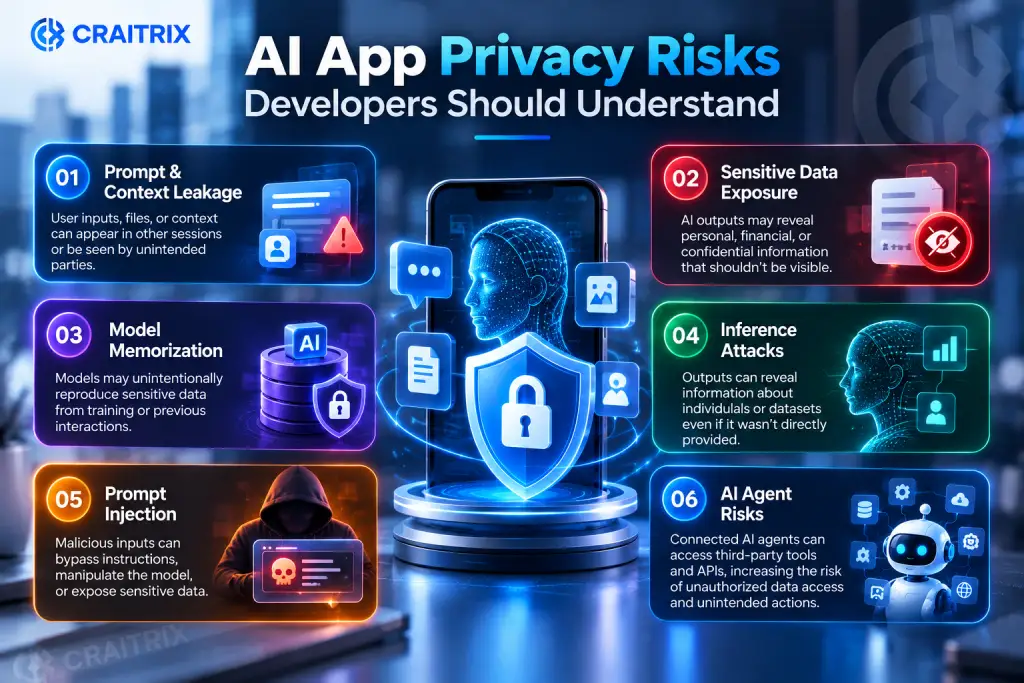
Prompt and Context Leakage: information included in one user’s prompt or session context can, under the wrong conditions, surface in another user’s response, particularly in poorly isolated multi-tenant systems.
Sensitive Data Exposure Through AI Outputs: a model can generate a response that includes information it shouldn’t have surfaced at all, sometimes pulled from earlier in the same conversation, sometimes from training data.
Model Memorization and Data Leakage: large models can memorize specific pieces of training data verbatim, and under the right prompting, reproduce that data later, even information that was supposed to stay private.
Inference Attacks: an attacker can sometimes work backward from a model’s outputs to guess details about the data it was trained or fine-tuned on.
Prompt Injection and Unauthorized Data Access: a crafted input can trick an AI system into ignoring its instructions and revealing data or performing actions it wasn’t meant to.
Risks From AI Agents and Tool-Calling Systems: an agent that can call APIs or take actions on a user’s behalf introduces a new category of risk, since a manipulated agent can potentially move real data, not just generate text.
How to Fix AI App Privacy: Start With Data Minimization
The single highest-leverage fix for most AI privacy problems is collecting less in the first place.
Collect Only What the Feature Actually Needs: if a chatbot doesn’t need an exact birthdate to answer a question, it shouldn’t be capturing one.
Avoid Storing Unnecessary Data: raw prompts and outputs don’t need to sit in permanent storage just because they were generated once.
Reduce Data Granularity: a rough location or an age range is often enough where exact GPS coordinates or a birthdate would be overkill.
Delete Data When Its Purpose Is Complete: a session that’s served its purpose doesn’t need to linger indefinitely on the off chance it’s useful later.
Use De-Identification and Aggregation Where Appropriate: stripping identifying details before analysis reduces what’s exposed if something ever goes wrong.
Build Privacy Into the AI App Architecture
Privacy that gets bolted on after launch rarely holds up well. It works better as part of the architecture from day one. Working with an experienced mobile app development company can help businesses plan secure AI architecture, controlled data access, and privacy measures from the beginning.
Map Every Data Flow Before Development: knowing exactly where data goes, from input to model to storage to any third party, catches problems before they’re built into the system.
Separate User Data From AI Processing: keeping the two loosely coupled makes it possible to change AI providers or processing logic without exposing raw user data unnecessarily.
Isolate Sensitive Data From Model Inputs: not everything in a user’s record needs to reach the model for a given feature to work.
Apply Role-Based Access Control: engineers debugging an issue rarely need the same access as the system serving live user requests.
Encrypt Data in Transit and at Rest: a baseline expectation at this point, not an advanced feature.
Create Clear Data Retention Rules: defined upfront, rather than figured out after a regulator or a user asks how long something’s been kept.
Design Secure AI Data Pipelines: the path data takes between systems needs the same scrutiny as the systems themselves.
Control What Your AI Model Can See
Even with solid architecture, the model itself needs guardrails on exactly what it’s allowed to process.
Input Filtering and Sanitization: stripping or masking sensitive fields before they reach the model reduces exposure without necessarily hurting the feature’s usefulness.
Remove Sensitive Information Before Processing: a support ticket that includes a card number shouldn’t pass that number straight into a prompt.
Restrict Model Access to Necessary Data: a feature that summarizes a document doesn’t need access to a user’s entire account history.
Prevent Sensitive Data From Entering Training Pipelines: data used to fine-tune a model needs its own review process, separate from data used for a single response.
Monitor AI Inputs and Outputs: logging what goes in and comes out, at least in aggregate, makes it possible to catch a leak instead of hearing about it from a user.
Apply Output Filtering and Validation: checking a response before it reaches the user catches sensitive data that slipped through earlier controls.
Don’t Ignore Third-Party AI APIs and SDKs
Most AI apps aren’t running their own models end to end. They’re calling someone else’s, which means a chunk of the privacy responsibility now depends on a vendor’s practices.
Know Where User Data Is Being Sent: it’s worth knowing exactly which vendor, region, and system a piece of user data lands in once it leaves the app.
Review AI Vendor Data-Handling Policies: not every provider treats a prompt the same way once it’s received.
Understand Training and Retention Practices: some vendors use submitted data to improve their models by default, others don’t, and the difference matters.
Control Third-Party SDK Permissions: an SDK often requests more access than the feature it powers actually requires.
Avoid Unnecessary Data Sharing: sending a full user profile when a single field would do just widens the exposure for no real benefit.
Audit the AI Supply Chain Regularly: vendor policies change, and a review that was accurate a year ago might not be anymore.
Give Users Real Control Over Their Data
A lot of this comes down to trust, and trust holds up better when users actually understand and control what’s happening.
Make Consent Clear and Specific: “we use your data to improve our services” tells a user almost nothing useful.
Explain Why Each Permission Is Needed: a location request tied to an actual feature makes more sense to a user than one requested at install with no context.
Let Users Revoke Permissions: consent that can’t be withdrawn isn’t really consent, just a one-time formality.
Provide Data Access and Deletion Options: users should be able to see what’s stored about them and remove it without submitting a support ticket and waiting a week.
Make AI Data Usage Policies Understandable: a privacy policy written for lawyers doesn’t help a user decide whether to trust a feature.
Use Just-in-Time Permission Requests: asking for access at the moment it’s actually needed gives the request context it wouldn’t have at signup.
Privacy-Enhancing Technologies AI Apps Can Use
A handful of technical approaches can reduce privacy risk directly, rather than relying purely on policy.
Data De-Identification
Strips or masks identifying fields from a dataset, useful for analysis where individual identity isn’t actually needed.
Data Aggregation
Combines individual data points into group-level statistics, so no single user’s information is directly exposed.
Differential Privacy
Adds carefully calibrated statistical noise to data or results, so a model can learn from patterns without exposing any single person’s exact record.
Federated Learning
Trains a model across many devices without the raw data ever leaving those devices; only the learned updates get shared centrally.
On-Device AI Processing
Runs inference locally instead of sending data to a server at all, cutting out an entire transmission and storage step for anything processed this way.
Privacy-Preserving Data Storage
Encrypts and segments stored data so that even someone with database access can’t easily reconstruct a full user profile.
Privacy-Preserving Computation
Techniques like secure multi-party computation let systems compute a result over data from multiple parties without any one party seeing the others’ raw inputs.
How to Test an AI App for Privacy Risks
Privacy testing needs to be a real, recurring exercise, not a checkbox before launch.
1. Conduct a privacy risk assessment before development gets too far along to change course easily
2. Test what actually enters and leaves the model, not just what the interface shows the user
3. Check for sensitive data leaking into outputs it was never meant to reach
4. Test that one user’s prompt or context genuinely stays isolated from another’s session
5. Audit permissions and API access to confirm they match what’s actually needed
6. Test data deletion and retention to confirm deleted data is actually gone, not just hidden
7. Monitor privacy risks after launch, since real usage surfaces edge cases testing rarely catches
8. Review AI privacy controls on a regular schedule, not just once at launch
The Future of AI Apps Is Privacy-First
Privacy is increasingly a product requirement, not a legal afterthought bolted on before launch. Users are getting more aware of what AI features actually do with their data, and regulators in multiple regions are moving in the same direction.
The apps that hold up long-term are the ones balancing genuine personalization with real user control, not maximizing data collection because it’s technically possible. A recommendation engine doesn’t need every data point available to be useful; it needs the right ones, handled well.
Trust, once it’s built into an AI product from the start, tends to compound. Users who understand and control what an app knows about them stay longer and share more, willingly, than users who feel like data is being taken from them by default. As AI adoption keeps growing across industries, privacy-by-design stops being a nice-to-have and starts being the thing that actually separates a product people trust from one they just tolerate.
Key Takeaways
• Data minimization is the highest-leverage fix: collect only what a feature genuinely needs
• Not everything in a user’s record should reach the AI model
• Third-party AI vendors carry real privacy responsibility; review their data practices directly
• Privacy testing has to continue after launch, not stop at it
• Users trust AI features more when they understand and control what’s collected
Conclusion
AI-powered apps don’t have a privacy problem because AI is inherently unsafe. They have one because privacy got treated as an afterthought while the AI features got built first. Fixing that doesn’t require abandoning personalization or slowing down development. It requires knowing exactly what data a feature needs, controlling what reaches the model, being honest with users about what’s happening, and testing all of it on a real schedule instead of once before launch.
The apps that get this right end up with something better than a compliance checkbox: users who trust the product enough to actually use what it can do.

FAQs About AI App Privacy
Q1. Are AI-powered apps safe for personal data?
Ans: They can be, though safety depends entirely on how data is collected, filtered, and handled before and after it reaches the model, not on the AI technology itself.
Q2. How can AI apps protect user privacy?
Ans: Through data minimization, isolating sensitive data from model inputs, strong access controls, transparent third-party integrations, and privacy testing that continues after launch.
Q3. How can AI apps protect user privacy?
Ans: Through data minimization, isolating sensitive data from model inputs, strong access controls, transparent third-party integrations, and privacy testing that continues after launch.
Q4. Should AI apps store user conversations?
Ans: Only for as long as there’s a genuine purpose, and ideally with sensitive details filtered out. Indefinite storage adds risk without adding value for most features.
Q5. Can AI models access private user information?
Ans: Yes, if it’s included in a prompt, document, or connected data source. Restricting what reaches the model in the first place is more reliable than trying to control it afterward.
Q6. How can developers prevent sensitive data from reaching an AI model?
Ans: Input filtering, data sanitization, and restricting each feature to only the data it actually needs before anything is sent to the model.
Q7. What privacy technologies can be used in AI applications?
Ans: Data de-identification, aggregation, differential privacy, federated learning, on-device processing, and privacy-preserving computation, depending on what the specific feature requires.
Q8. How does data minimization improve AI app privacy?
Ans: Less data collected means less exposure if something goes wrong, and less data flowing into a model that could otherwise infer or expose more than intended.
Q9. How often should an AI app undergo privacy testing?
Ans: Regularly, not just before launch. New features, model updates, and vendor changes all introduce new privacy considerations worth retesting.
Q10. What should developers check before integrating a third-party AI API?
Ans: Where the data is sent, whether it’s used for training by default, how long it’s retained, and what permissions the integration actually requires versus what it requests.