An app is rarely just software. For a business, it might be a sales channel, a support desk, a booking system, a staff workspace, a marketplace, or the whole product.
So when a company sells mobile app development services, you’re getting more than code. Planning, UI/UX design, backend work, integrations, testing, launch, security, and upkeep usually all come with it.
What you build also changes the approach. A startup testing an idea probably needs a tight MVP. An established company often wants a custom app wired into its CRM, ERP, or payment tools.
This guide covers what these services include, the main ways to build, how the process runs, what drives cost and timelines, and the trends worth knowing in 2026.
What Are Mobile App Development Services?
These are the professional services involved in planning, designing, building, testing, launching, and maintaining apps for phones and tablets.
A full project can pull in product managers, designers, mobile developers, backend engineers, QA testers, and DevOps people. Who actually shows up depends on how big and complicated the app is.
Good teams don’t treat it as one big coding job. They move through a series of connected stages.
What Does Mobile App Development Include?
A typical project can cover:
- Business and product discovery
- Requirement analysis
- UI/UX design
- Prototyping
- Native or cross-platform development
- Backend and database work
- API and third-party integrations
- Testing and quality assurance
- Security and performance checks
- App Store and Google Play release
- Maintenance and support
- Analytics and feature updates
Not every business needs all of this at full depth, though. A basic internal tool and a real-time marketplace or finance app are very different jobs.
Who Uses Mobile App Development Services?
Pretty much every industry. Retailers build shopping and loyalty apps. Healthcare providers handle appointments, consultations, and patient messages through them. Logistics firms need driver and delivery apps, and service businesses use them for bookings and managing staff.
Startups usually come to turn an idea into an MVP. Bigger organizations tend to want enterprise apps that plug into the systems they already run.
What Services Does a Mobile App Development Company Offer?
A professional company can take on the whole app lifecycle or just a slice of it.
Choose the scope based on your product, your users, your business model, and your technical needs, not because a service happens to be on the menu.
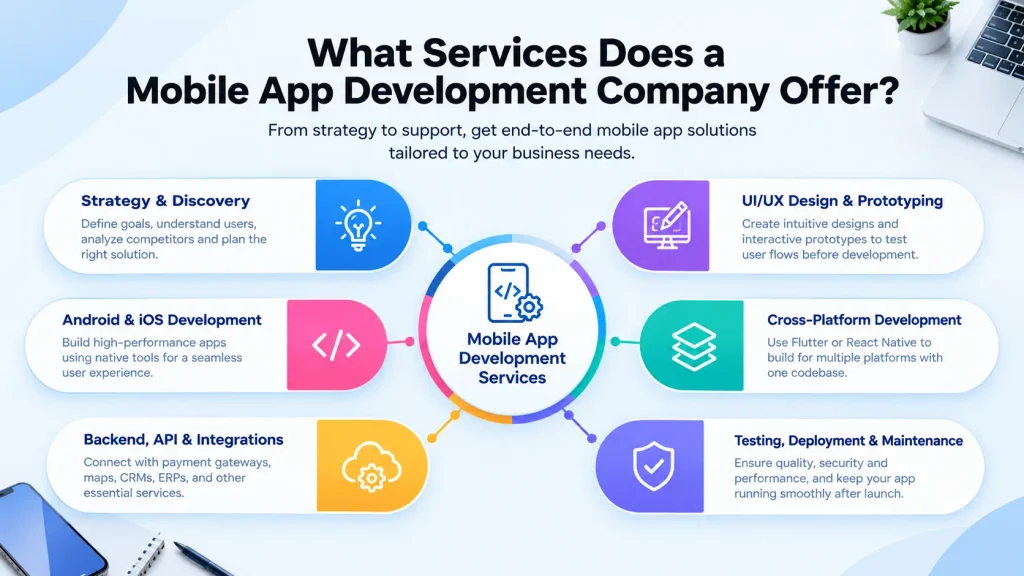
Mobile App Strategy and Product Discovery
Before anyone writes code, the team needs to know what the app is meant to achieve.
That usually means pinning down target users, defining the core problem, looking at competitors, ranking features, setting the MVP scope, and spotting technical limits.
A food delivery app and an employee management app, for instance, work in completely different ways. Sorting that out early keeps unneeded features out of the first release.
Mobile App UI/UX Design and Prototyping
Good mobile design isn’t only about attractive screens.
Designers map how people move through the app, where they type things in, how they finish key tasks, and what happens when something breaks.
Wireframes and prototypes let you test those flows before development starts. A confusing screen or a pointless step is far cheaper to fix on paper than in code.
Android and iOS App Development
You can build for Android, iOS, or both.
Native development uses each platform’s own tools. It makes sense when an app needs deep platform integration, specific device features, or very tuned performance.
Pick based on what the app needs, not on which platform is more popular.
Cross-Platform Mobile App Development
Cross-platform development lets a team build for several platforms from one shared codebase. Flutter and React Native are the names that come up most.
It works well if you want Android and iOS users covered without running two separate builds. Some parts of an app may still need native code, though, if they rely on platform-specific features.
Backend, API and Third-Party Integration
The app on someone’s phone is only one piece of a bigger system.
A backend typically handles users, transactions, business rules, databases, notifications, and app data. APIs let the app talk to that backend and to outside services.
Depending on the project, integrations might include:
- Payment gateways
- Maps and location services
- CRM systems
- ERP platforms
- Cloud services
- Social login
- Push notifications
- Analytics platforms
- Communication tools
For enterprise apps, planning the integrations can matter as much as designing the interface.
App Testing, Deployment and Maintenance
Testing shouldn’t wait until the end. It should run alongside development.
QA teams check functionality, usability, device compatibility, performance, security, poor network conditions, and odd edge cases.
Once testing is done, the app gets prepared for the app stores. But launch isn’t the finish line. OS updates, new devices, bugs, security problems, slow performance, and changing business needs all create more work later.
Types of Mobile App Development Services
Apps shouldn’t all be built the same way. The best approach depends on requirements, users, budget, timeline, integrations, and how much growth you expect.
Native Mobile App Development
Native apps are built for one specific operating system.
iOS development commonly uses Swift or SwiftUI, while Android apps often use Kotlin and related Android tools.
Native is worth considering when performance, platform-specific features, or deep device integration really matter.
Cross-Platform App Development
Here, a large share of the code is shared across platforms.
That suits businesses that need both Android and iOS apps and would rather manage one development approach.
Still, look at the functionality first. If an app needs unusual device capabilities or a very platform-specific feel, native may serve it better.
Custom Mobile App Development
Custom development builds the app around your own workflows, users, features, branding, and integration needs.
You don’t bend your process to fit a ready-made product. The software is shaped around how you actually work.
It tends to pay off for businesses with unusual workflows, complex integrations, specialized user experiences, or long-term product plans.
Enterprise Mobile App Development
Enterprise apps usually support internal teams, customers, partners, or field workers.
They often need:
- Role-based access
- Enterprise authentication
- CRM or ERP integration
- Secure data handling
- Admin dashboards
- Reporting
- Offline capabilities
- Scalable infrastructure
The architecture has to handle today’s users and tomorrow’s growth.
MVP Mobile App Development
An MVP is the smallest sensible version of a product that you can release and learn from.
Rather than building every feature you can think of, you find the core problem and build only what’s needed to solve it.
This helps startups and new product teams gather real feedback before investing in more.
Custom Mobile App Development vs Ready-Made Solutions
One of the first choices a business faces is whether to build custom or buy something off the shelf.
Neither is automatically the right call.
What Is Custom Mobile App Development?
Custom development means building software around your specific requirements.
A logistics company, for example, may need a driver app tied into its own dispatch system. A standard template probably won’t handle that exact workflow, those permissions, or that reporting.
You get more control, but you also put in more planning and development effort.
What Are Ready-Made or Template-Based Apps?
Ready-made solutions come with predefined functionality that you can usually configure for your business.
They’re a reasonable fit when you need something straightforward and don’t need much customization.
The catch is that you work within whatever the product can and can’t do.
Custom vs Ready-Made Mobile Apps: Which Fits Your Business?
| Factor | Custom app | Ready-made solution |
| Features | Built around your requirements | Predefined |
| Branding | Highly flexible | Usually more limited |
| Integrations | Can be designed specifically | Depends on what’s available |
| Scalability | Architecture planned around growth | Depends on the solution |
| Initial effort | Higher | Usually lower |
| Flexibility | High | Depends on the provider |
The right pick depends on the problem you’re solving. A simple need may not justify a fully custom product, while a business with unique workflows can outgrow a template fast.
How Does the Mobile App Development Process Work?
A structured process turns an idea into a working product without making the whole thing feel like one giant task.
Discovery and Requirement Analysis
The project begins by defining the business goal, target users, main workflows, required features, integrations, and technical limits.
This is also the point to split features into must-haves and later additions.
UI/UX Design and Prototyping
Designers turn requirements into user flows, wireframes, interface designs, and clickable prototypes.
The aim is to check the experience before any heavy development begins.
Technology and Architecture Planning
The technical team decides how the app will be structured.
That can mean choosing between native and cross-platform, picking backend technologies, planning APIs and databases, setting up authentication, and deciding how the app will scale.
Development and Integration
Developers then build the mobile interface and the backend.
APIs and outside services get connected as needed. Work is often split into smaller milestones so progress can be reviewed along the way.
Testing and Quality Assurance
The app is tested across the devices and scenarios that matter.
That can cover functionality, performance, security, usability, compatibility, network conditions, and how the app behaves when things go wrong.
App Store Launch and Post-Launch Support
After testing and final prep, the app goes to the relevant app stores.
Afterward, the work may include tracking crashes, fixing bugs, improving performance, adapting to OS changes, and adding features based on what users say.
How to Choose the Right Mobile App Development Company
Picking a partner takes more than flipping through portfolio screenshots or scanning a list of companies.
Check Technical Expertise and Development Capabilities
Look for experience in the technologies your app will actually use.
That might be native development, Flutter, React Native, backend work, cloud infrastructure, APIs, AI integrations, analytics, or enterprise systems.
Review Previous Mobile App Projects
A portfolio helps most when the projects resemble yours.
Look for apps with similar features, industry challenges, integrations, or technical complexity.
Evaluate the Development Process and Communication
Ask how the company handles discovery, design sign-off, milestones, testing, feedback, and day-to-day communication.
When the process is clear, you know what to expect at every stage.
Understand Ownership, Security and Post-Launch Support
Before you sign anything, get clarity on who owns the source code, designs, app accounts, data, infrastructure, and intellectual property.
Ask, too, how bugs, security updates, OS changes, and future enhancements will be handled.
Compare Companies Based on Project Fit, Not Just Rankings
There’s no universal “best mobile app development company.”
The right one depends on your project.
Compare on relevant experience, technical skills, communication, methodology, security practices, pricing structure, ownership terms, and post-launch support.
What Is the Cost and Timeline of Mobile App Development?
No single price or timeline fits every app.
Scope is the biggest factor.
What Factors Affect Mobile App Development Cost?
Cost can be shaped by:
- Number of platforms
- Number and complexity of features
- UI/UX requirements
- Backend development
- Third-party integrations
- Real-time functionality
- AI features
- Security requirements
- Testing requirements
- Admin dashboards
- Post-launch maintenance
A simple MVP and a multi-sided marketplace might both get called “mobile apps,” yet what it takes to build them is worlds apart.
How Long Does It Take to Develop a Mobile App?
It depends on scope and approach.
A focused MVP with a few workflows moves faster than an enterprise product with multiple user roles, complex integrations, real-time communication, and advanced security.
A practical way to plan is to define the MVP first, estimate each stage, and then sketch a roadmap for later releases.
How Can Businesses Control Development Costs?
Define requirements early and keep unnecessary features out of the first release.
Other things help too: ranking features by priority, validating prototypes before development, reusing components where it makes sense, and rolling out in phases.
The goal isn’t the cheapest possible app. It’s spending your budget on the features your users care about most.
Mobile App Development Trends Shaping 2026
Apps keep changing as AI, device hardware, security expectations, and development frameworks move forward.
AI-Native Mobile Applications
AI has gone well beyond basic chatbots.
Apps can now offer smart search, recommendations, personalization, document processing, automation, content generation, and other AI-assisted workflows.
For a business, the real question isn’t “Can we add AI?” It’s “Does AI make a real user or business workflow better?”
On-Device AI and Privacy-Focused Experiences
Some AI tasks can now run directly on supported devices instead of sending every request to a server.
Depending on the use case, that can help with speed, offline use, and privacy.
The right setup depends on the model, the device, how sensitive the data is, and what the app needs.
AI Agents and Intelligent Workflows
AI agents are becoming useful for apps that have to carry out several steps from a user’s instruction.
An app might search for information, prepare a request, or coordinate a workflow rather than just reply with text.
These systems still need clear permissions, security controls, and boundaries.
Cross-Platform Development Maturity
Cross-platform frameworks keep giving teams more options for building across platforms.
Even so, the decision should follow the app. Native can still be the better choice when you need specialized platform features or tightly optimized performance.
Security, Passkeys and Privacy-Centric Development
Security matters more as apps handle payments, personal details, business data, and login credentials.
Teams should treat mobile application security, secure authentication, authorization, encrypted communication, safe data storage, API protection, and privacy requirements as part of the architecture, not something bolted on at the end.
How Custom Mobile App Development Supports Different Business Needs
A custom app can be shaped around the way a business really operates.
Customer-Facing Mobile Applications
Businesses build customer apps for things like:
- E-commerce
- Food delivery
- Travel and booking
- Healthcare
- Education
- Fitness
- Financial services
- Marketplaces
- On-demand services
What matters is matching the app to the customer’s actual journey.
Internal Business and Workforce Apps
Not every app has to face customers.
Companies use mobile software for field service, staff communication, inventory, sales operations, delivery management, inspections, and workforce coordination.
When these apps are built around existing workflows, they can cut down on manual work.
Enterprise and Integrated Mobile Solutions
Enterprise apps often have to work with systems that are already in place.
A mobile app might connect to a CRM, ERP, HR platform, inventory system, payment platform, or analytics tool through APIs and other integration methods.
That’s where custom software and enterprise solutions really earn their place.
Startup MVPs and New Digital Products
For startups, the first job is usually finding out whether the idea solves a real problem.
A focused MVP is a sensible place to start. After launch, user feedback and business data can point to what to build next.
That turns the first launch into the start of a product cycle, not the final version.
Why Businesses Work With a Professional Mobile App Development Company
A professional team brings several skill sets together, so one person doesn’t have to cover everything.
Access to a Multidisciplinary Development Team
Depending on the project, the team might include:
- Product managers
- Business analysts
- UI/UX designers
- Mobile developers
- Backend developers
- QA engineers
- DevOps specialists
- Project managers
Together they cover the product, design, technical, and quality sides at once.
Reduced Technical and Delivery Risks
Experience with architecture, testing, integrations, deployment, and security helps catch technical problems sooner.
The project begins by defining the business goal, target users, main workflows, required features, integrations, and technical limits. If you’re looking for a more detailed mobile app development guide, this process can help you understand each stage from planning to launch.
Long-Term Product Development
Launching an app is only the beginning.
User feedback, analytics, new OS versions, security demands, shifting business needs, and new technology all shape later releases.
A development partner who understands the product beyond launch day can support it through that ongoing life.
Frequently Asked Questions About Mobile App Development Services
Q1. What are mobile app development services?
They cover planning, designing, building, testing, deploying, and maintaining mobile apps. Depending on the project, they can also include backend development, API integration, cloud infrastructure, security, analytics, and post-launch support.
Q2. What does a mobile app development company do?
It helps turn a business idea or requirement into a working mobile app. The work can include product discovery, UI/UX design, frontend and backend development, integrations, testing, app-store release, maintenance, and later enhancements.
Q3. What is custom mobile app development?
It means building an app around a business’s specific requirements instead of fitting the business into a fixed template. That can include tailored features, workflows, integrations, branding, user roles, and backend architecture.
Q4. How much do mobile app development services cost?
It depends on features, platforms, UI/UX complexity, backend needs, integrations, security, testing, and maintenance. A simple MVP will generally cost very differently from an enterprise app with multiple roles and complex integrations.
Q5. How long does it take to develop a mobile app?
That depends on scope and technical complexity. A focused MVP can be built faster than a large app that needs multiple platforms, advanced features, backend systems, third-party integrations, and extensive testing.
Q6. Should I choose native or cross-platform mobile app development?
Native suits cases where platform-specific performance or device capabilities matter. Cross-platform works when you want to support several platforms from a shared codebase. The right choice comes down to your product requirements.
Q7. What is the difference between custom and ready-made mobile apps?
A custom app is built around your specific requirements, while a ready-made one offers predefined functionality you can usually configure. Custom gives you more flexibility, and ready-made can be practical when your needs are simpler.
Q8. Can a mobile app integrate with an existing CRM or ERP?
Yes. Apps can connect to CRM, ERP, payment, analytics, inventory, and other systems through APIs and integration layers. The exact approach depends on the systems involved and which data and workflows need to be shared.
Q9. Can AI be integrated into a mobile application?
Yes. AI can power recommendations, smart search, personalization, document processing, automation, conversational interfaces, image analysis, and more. The right architecture depends on the use case, the data, privacy needs, and performance expectations.
Q10. How do I choose the best mobile app development company?
Start by defining your requirements, then compare providers on relevant experience, technical skills, portfolio, process, communication, security, ownership terms, pricing, and post-launch support. The best fit depends on your project, not a generic ranking.
Q11. Can a mobile app be developed for both Android and iOS?
Yes. You can build separate native apps for each, or go cross-platform with something like Flutter or React Native. The best option depends on the app’s functionality, performance needs, team setup, and long-term roadmap.